How to Translate eLearning Courses and Localize Assets
Learn how to translate eLearning courses, localize images, videos, audio, PDFs, and resource files, then export multilingual SCORM packages for any LMS.
If your organization operates across borders or you're a freelancer building courses for international clients, you've probably faced the multilingual challenge. How do you create training content that resonates with learners who speak different languages, while keeping screenshots, videos, audio, PDFs, and resource files aligned with each locale?
ScormStack makes localization straightforward. Instead of managing separate course files for each language, you can translate eLearning course content, localize course assets, and export multilingual SCORM packages that run cleanly in any LMS.
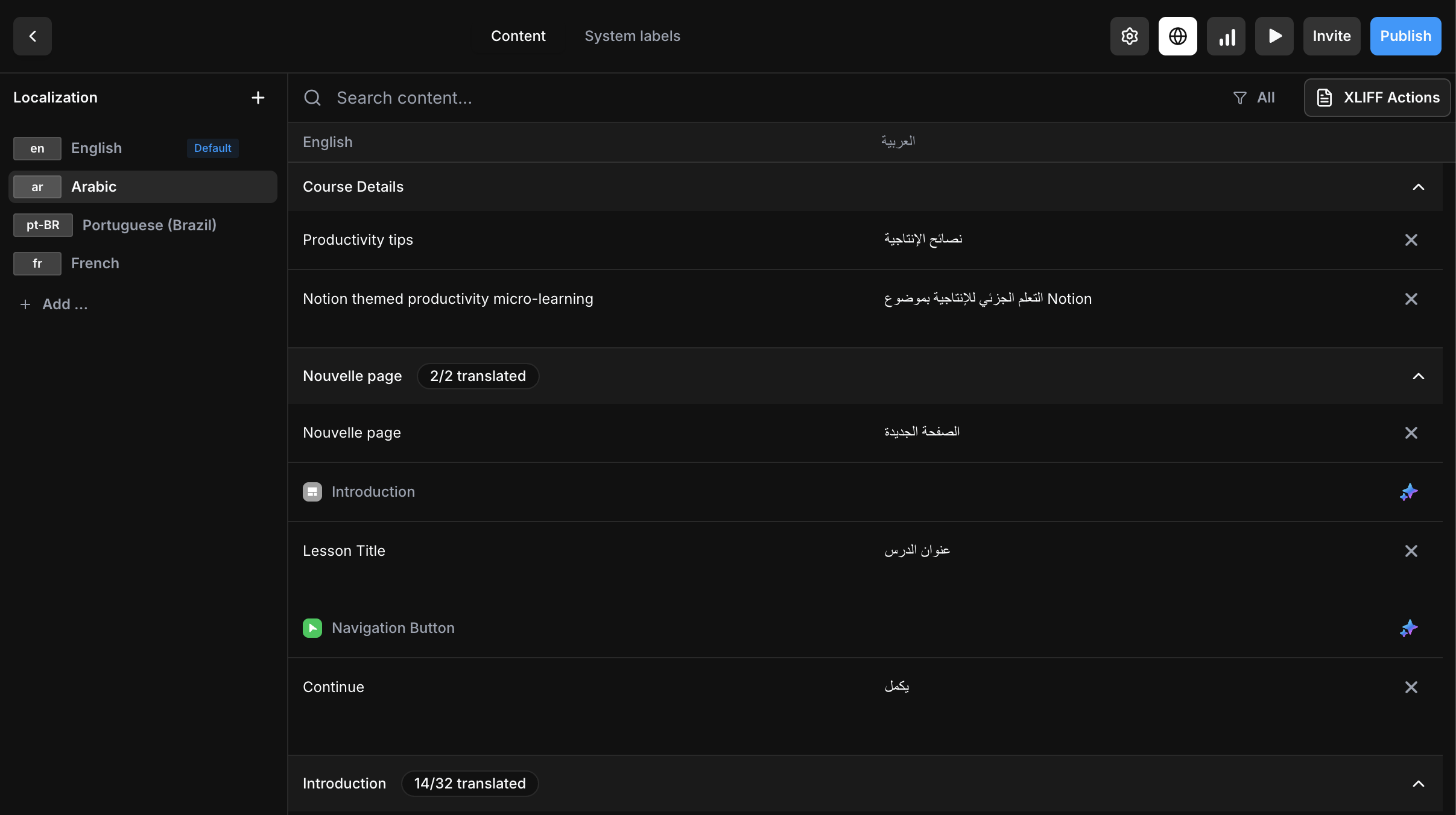
The localization workspace now includes course content, system labels, and per-language asset overrides in one place.
Why multilingual matters
Global teams need consistent training experiences. Whether you're onboarding new hires in Tokyo, training sales reps in São Paulo, or rolling out compliance modules across Europe, language barriers shouldn't slow you down.
The traditional approach—duplicating courses and manually translating each version—creates maintenance headaches. Update one course? Now you need to update five. ScormStack takes a different path.
How ScormStack handles localization
ScormStack supports 14 languages with full system label translations and course-level localization tools. Here's how it works:
-
Create your course in your primary language — Build once with all your content, assessments, and media.
-
Add additional locales — Use the locale dialog to add supported languages.
-
Translate your content — ScormStack provides tools to manage translations across all your course text, from lesson content to button labels.
-
Localize your assets — Replace images, videos, poster images, audio, PDFs, resource links, and downloadable files for each language when a translated or regional version is needed.
-
Export a single SCORM package — Your multilingual course bundles translated content and localized assets into one clean package that works in Moodle, Open edX, Docebo, or any compliant LMS.
Supported languages
These 14 languages include fully translated UI elements (buttons, navigation, assessment feedback, etc.) out of the box:
| Language | Code |
|---|---|
| English | en |
| French | fr |
| Spanish | es |
| German | de |
| Portuguese | pt |
| Portuguese (Brazil) | pt-BR |
| Arabic | ar |
| Swedish | sv |
| Italian | it |
| Ukrainian | uk |
| Polish | pl |
| Dutch | nl |
| Hungarian | hu |
| Russian | ru |
For these languages, your course will display localized navigation ("Next", "Previous", "Submit"), assessment feedback ("Correct", "Incorrect"), and all interface labels automatically.
RTL (Right-to-Left) Support — Arabic is fully supported with proper right-to-left text direction throughout your course.
Need a different language? Contact our support team to request additional language support. We're actively expanding our language coverage based on user needs.
What gets translated and localized?
When you localize a course in ScormStack, you can translate text content and localize media assets from the same workspace.
For course content, you can translate:
- Lesson and section titles
- All text blocks and rich content
- Assessment questions and answer choices
- Feedback messages
- Navigation labels and interface elements
For course assets, you can localize:
- Image block media
- Video sources and video poster images
- Audio sources and voiceovers
- PDF files
- Resource URLs and downloadable resource files
If a localized asset is not needed, ScormStack keeps the default source asset for that locale. That means you only replace the media that actually needs translation or regional adaptation.
Localize images, videos, audio, PDFs, and resource files
Course translation often goes beyond text. Product screenshots may need translated UI labels, voiceovers may need a native-language version, compliance PDFs may differ by country, and resource links may point to regional documentation.
ScormStack now includes an Assets tab alongside Content and System Labels in the localization workspace. For each language, you can replace the source asset with a localized version while keeping the same course structure.
This helps teams localize:
- Screenshots and image-based instructions
- Training videos and poster images
- Audio narration and voiceovers
- PDF handouts, policies, and compliance documents
- Resource file downloads and external resource URLs
Localized assets can be selected by URL, uploaded directly, or reused from the Media Library. The workspace stays organized block by block, with search support and safe metadata handling for media IDs, file names, video aspect ratios, and audio durations.
Text translation, AI translation, and XLIFF imports preserve existing asset overrides, so translators can keep working on copy while course authors manage localized media.
Best practices for multilingual courses
Write for translation from the start. Clear, concise source content translates better. Avoid idioms, colloquialisms, and overly complex sentence structures.
Plan for text expansion. Translated text often runs 15-30% longer than English. Design your layouts with breathing room so German or French versions don't feel cramped.
Avoid text inside images when possible. If screenshots or diagrams include embedded text, plan how those assets will be localized.
Use per-locale assets where they matter. Replace screenshots, voiceovers, PDFs, videos, and resource links only when the learner needs a translated or regional version.
Keep file naming predictable. Consistent asset names help reviewers and translators understand which localized file belongs to which language.
Test before you publish. Preview each locale to catch formatting issues, truncated text, missing media, or localized assets that don't quite work in context.
Work with native speakers. Machine translation is getting better, but subject matter experts who speak the target language will catch nuances that automated tools miss.
Locale limits by plan
ScormStack's subscription tiers include different locale allowances:
| Plan | Locales per Course |
|---|---|
| Free | 1 |
| Basic | 1 |
| Pro | Unlimited |
If you're building courses for a single region, the Free or Basic tier works fine. For global rollouts with multiple languages, Pro unlocks unlimited locales.
XLIFF import for professional workflows
For teams working with professional translators, ScormStack supports XLIFF format import. Export your course text, send it to your translation team, and import the completed translations back into your course.
This fits neatly into enterprise localization workflows where specialized translation management systems (TMS) are already in use. XLIFF imports update translated text without removing existing localized asset overrides, so translators can handle copy while course authors manage media localization.
One package, many languages
The traditional e-learning approach of creating separate courses per language is fragmented and error-prone. ScormStack's locale system keeps everything in sync:
- Single source of truth — One course, all languages.
- Consistent updates — Change the source, update all versions.
- Localized assets — Replace media only for the languages that need it.
- Clean exports — One SCORM package, any LMS.
During export, ScormStack bundles localized files and rewrites asset references for the selected package. You can export one locale for a focused rollout or include multiple languages in the same SCORM package.
Ready to go global?
Whether you're training employees across continents or selling courses to an international audience, ScormStack gives you the tools to translate content, localize assets, review each locale, and build multilingual learning experiences without the complexity.
👉 Start your free trial and create your first multilingual course today.
FAQs about translating eLearning courses
Can I translate an eLearning course without duplicating it?
Yes. ScormStack lets you keep one source course, add target locales, translate learner-facing content, and export language-ready SCORM packages without maintaining separate course copies.
Can I localize images and videos in a SCORM course?
Yes. ScormStack supports per-language replacements for image block media, video sources, video poster images, audio files, PDFs, resource URLs, and downloadable resource files.
Does a multilingual SCORM package include localized assets?
Yes. When you export a localized SCORM package, ScormStack includes the localized files needed for the selected language or multilingual package and rewrites asset references for delivery.
Can translators use XLIFF while authors localize media?
Yes. XLIFF imports update translated text and preserve existing asset overrides, so translation teams and course authors can work in parallel.
Which eLearning content should be localized first?
Start with the content learners must understand to complete the course: instructions, quiz questions, feedback, completion messages, key screenshots, PDFs, videos, and resource links.