How to Translate Your eLearning Courses for a Global Audience
Learn how to create multilingual SCORM courses with ScormStack. Reach learners worldwide with localized training content that works in any LMS.
If your organization operates across borders or you're a freelancer building courses for international clients—you've probably faced the multilingual challenge. How do you create training content that resonates with learners who speak different languages?
ScormStack makes localization straightforward. Instead of managing separate course files for each language, you can build multilingual courses that export cleanly to SCORM and run seamlessly in any LMS.
Why multilingual matters
Global teams need consistent training experiences. Whether you're onboarding new hires in Tokyo, training sales reps in São Paulo, or rolling out compliance modules across Europe, language barriers shouldn't slow you down.
The traditional approach—duplicating courses and manually translating each version—creates maintenance headaches. Update one course? Now you need to update five. ScormStack takes a different path.
How ScormStack handles localization
ScormStack supports 14 languages with full system label translations. Here's how it works:
-
Create your course in your primary language — Build once with all your content, assessments, and media.
-
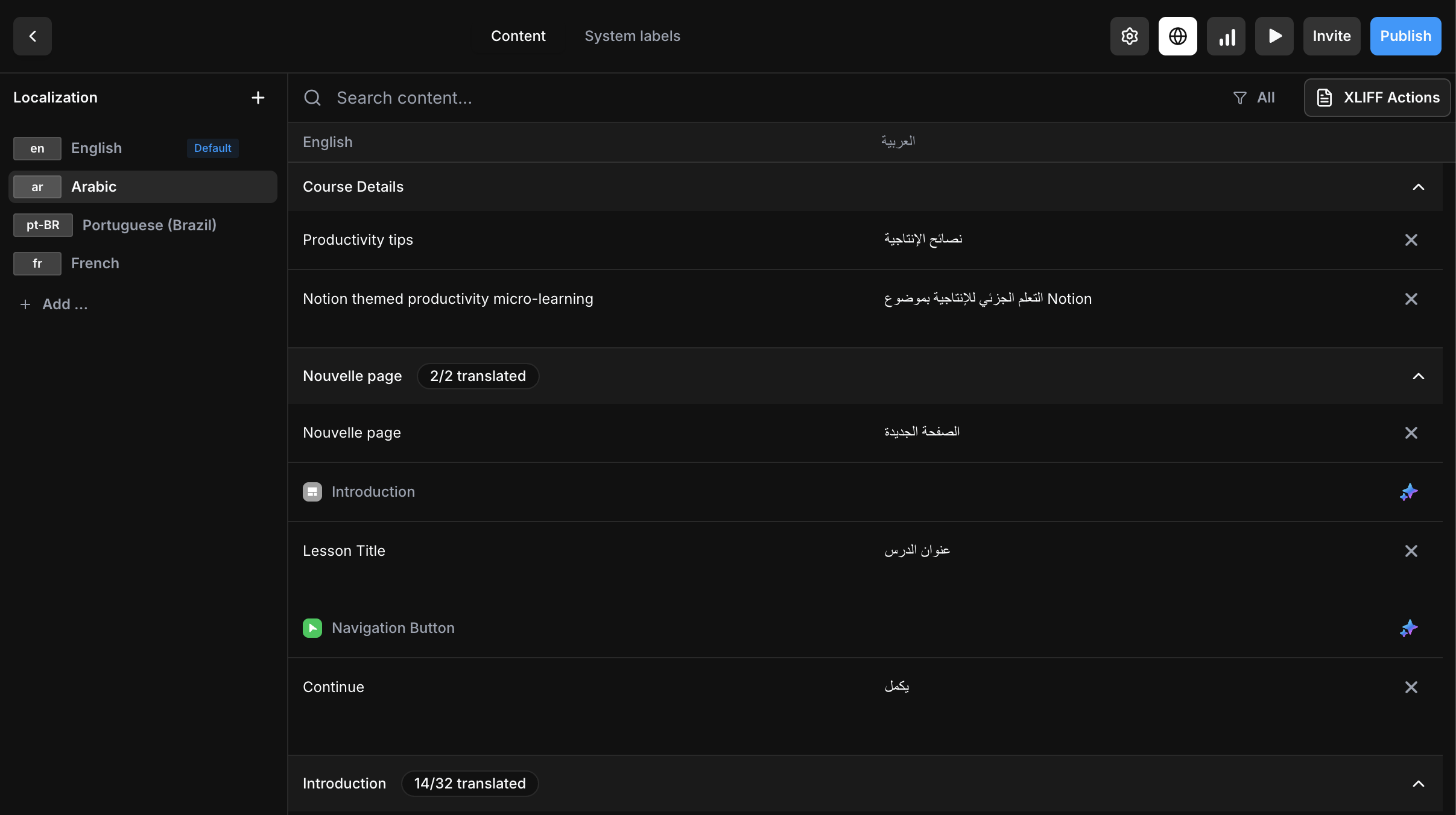
Add additional locales — Use the locale dialog to add supported languages.
-
Translate your content — ScormStack provides tools to manage translations across all your course text, from lesson content to button labels.
-
Export a single SCORM package — Your multilingual course bundles into one clean package that works in Moodle, Open edX, Docebo, or any compliant LMS.
Supported languages
These 14 languages include fully translated UI elements (buttons, navigation, assessment feedback, etc.) out of the box:
| Language | Code |
|---|---|
| English | en |
| French | fr |
| Spanish | es |
| German | de |
| Portuguese | pt |
| Portuguese (Brazil) | pt-BR |
| Arabic | ar |
| Swedish | sv |
| Italian | it |
| Ukrainian | uk |
| Polish | pl |
| Dutch | nl |
| Hungarian | hu |
| Russian | ru |
For these languages, your course will display localized navigation ("Next", "Previous", "Submit"), assessment feedback ("Correct", "Incorrect"), and all interface labels automatically.
RTL (Right-to-Left) Support — Arabic is fully supported with proper right-to-left text direction throughout your course.
Need a different language? Contact our support team to request additional language support. We're actively expanding our language coverage based on user needs.
What gets translated?
When you localize a course in ScormStack, you can translate:
- Lesson and section titles
- All text blocks and rich content
- Assessment questions and answer choices
- Feedback messages
- Navigation labels and interface elements
Media assets like videos and images can be swapped per locale if needed, but text-based content is where localization shines.
Best practices for multilingual courses
Write for translation from the start. Clear, concise source content translates better. Avoid idioms, colloquialisms, and overly complex sentence structures.
Plan for text expansion. Translated text often runs 15–30% longer than English. Design your layouts with breathing room so German or French versions don't feel cramped.
Test before you publish. Preview each locale to catch formatting issues, truncated text, or content that doesn't quite work in context.
Work with native speakers. Machine translation is getting better, but subject matter experts who speak the target language will catch nuances that automated tools miss.
Locale limits by plan
ScormStack's subscription tiers include different locale allowances:
| Plan | Locales per Course |
|---|---|
| Free | 1 |
| Starter | 1 |
| Pro | Unlimited |
If you're building courses for a single region, the Free or Starter tier works fine. For global rollouts with multiple languages, Pro unlocks unlimited locales.
XLIFF import for professional workflows
For teams working with professional translators, ScormStack supports XLIFF format import. Export your course text, send it to your translation team, and import the completed translations back into your course.
This fits neatly into enterprise localization workflows where specialized translation management systems (TMS) are already in use.
One package, many languages
The traditional e-learning approach of creating separate courses per language is fragmented and error-prone. ScormStack's locale system keeps everything in sync:
- Single source of truth — One course, all languages.
- Consistent updates — Change the source, update all versions.
- Clean exports — One SCORM package, any LMS.
Ready to go global?
Whether you're training employees across continents or selling courses to an international audience, ScormStack gives you the tools to build multilingual learning experiences without the complexity.
👉 Start your free trial and create your first multilingual course today.